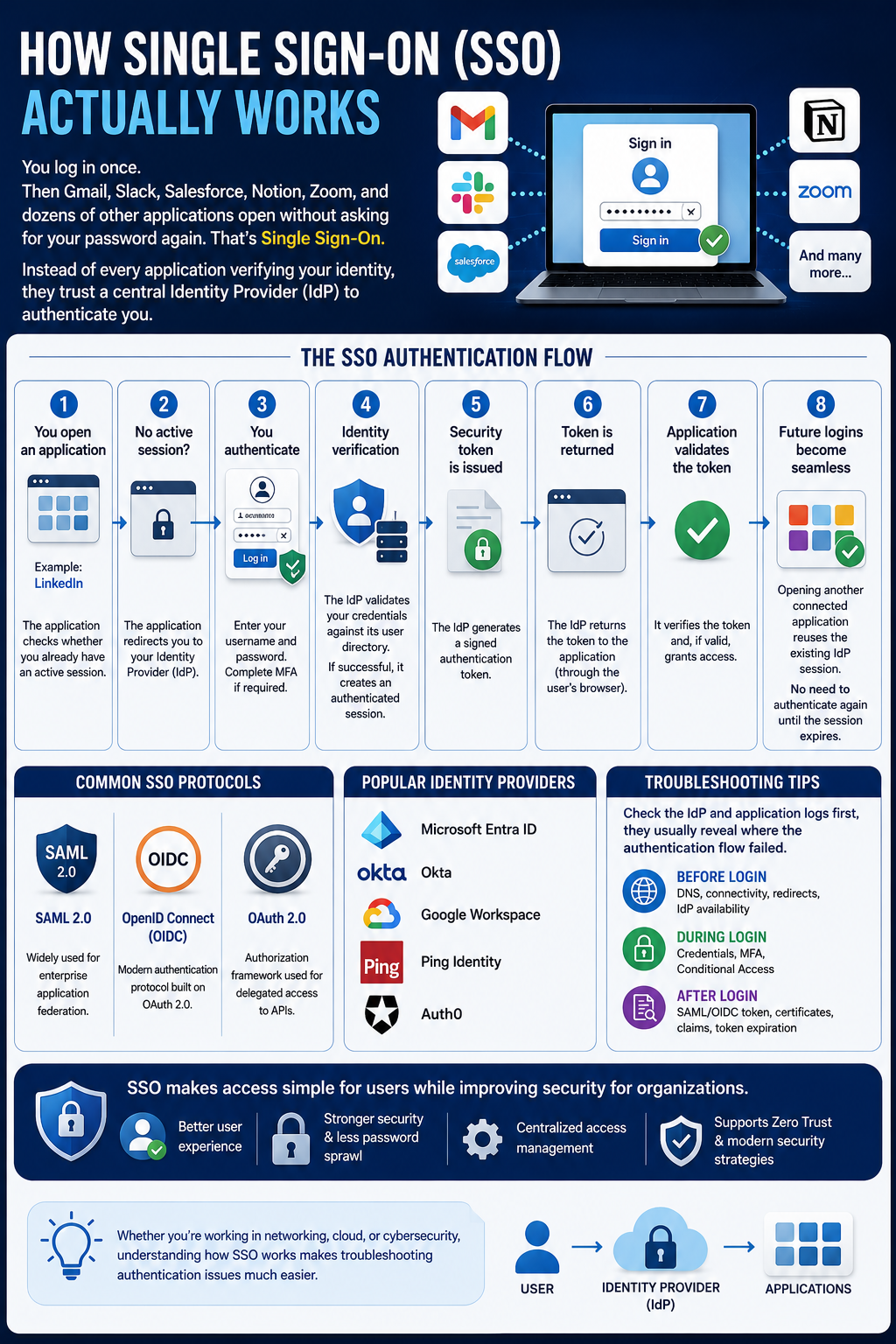
You sign in once.
Then Microsoft 365, Salesforce, Slack, Zoom, and other connected applications open without repeatedly asking for your password.
That's Single Sign-On (SSO).
Instead of every application independently authenticating you, they establish trust with a centralized Identity Provider (IdP) such as Microsoft Entra ID, Okta, Ping Identity, or another identity platform.
The IdP handles authentication and provides trusted identity information to the application.
🔄 A Simplified SSO Flow
1️⃣ User opens an application
The application checks whether an authenticated session already exists.
⬇️
2️⃣ No session? Redirect to the IdP
The application sends the authentication request to the configured Identity Provider.
⬇️
3️⃣ User authenticates
The user signs in and completes MFA or other security requirements when required.
⬇️
4️⃣ Identity and security checks occur
The IdP authenticates the user and can evaluate additional controls such as Conditional Access.
⬇️
5️⃣ Authentication response/token is issued
Depending on the protocol, the IdP generates a signed SAML assertion or OIDC ID token containing identity claims.
⬇️
6️⃣ Response returns to the application
The browser redirects the authentication response back to the application.
⬇️
7️⃣ Application validates it
The application verifies elements such as the issuer, signature, audience, validity period, and relevant claims before creating its own session.
⬇️
8️⃣ SSO takes over
When the user opens another integrated application, the existing IdP session can often be reused.
No additional password prompt—unless authentication or security policy requires it.
🔑 Common SSO Technologies
🔹 SAML 2.0 – Widely used for enterprise application federation
🔹 OpenID Connect (OIDC) – Modern authentication protocol built on OAuth 2.0
🔹 OAuth 2.0 – Primarily used for delegated authorization and API access
🛠️ Troubleshooting SSO
When SSO fails, identify where in the authentication flow the problem occurs:
🌐 Before authentication
DNS • Connectivity • Redirect URI • IdP availability
🔐 During authentication
Credentials • MFA • Conditional Access • Account status
🎫 After authentication
SAML/OIDC response • Token claims • Signing certificates • Audience • Token expiration • Application configuration
Checking both the Identity Provider logs and application logs can quickly help isolate where the authentication flow is breaking.
💡 Bottom line: SSO isn't simply about convenience. Centralizing authentication can reduce password exposure, provide consistent security controls, simplify access management, and improve the user experience.
Whether you work in Cloud, Networking, Identity, or Cybersecurity, understanding the SSO authentication flow is an essential skill for troubleshooting modern enterprise applications.