🖥️ Microsoft Intune now provides native Windows Registry Inventory—making device configuration verification easier than ever.
One of the biggest challenges for IT administrators has been verifying the actual configuration of Windows devices at scale. Historically, checking registry settings meant creating and maintaining custom PowerShell scripts, which added complexity and ongoing maintenance.
With Microsoft Intune 2607, that's changing.
🚀 What's new?
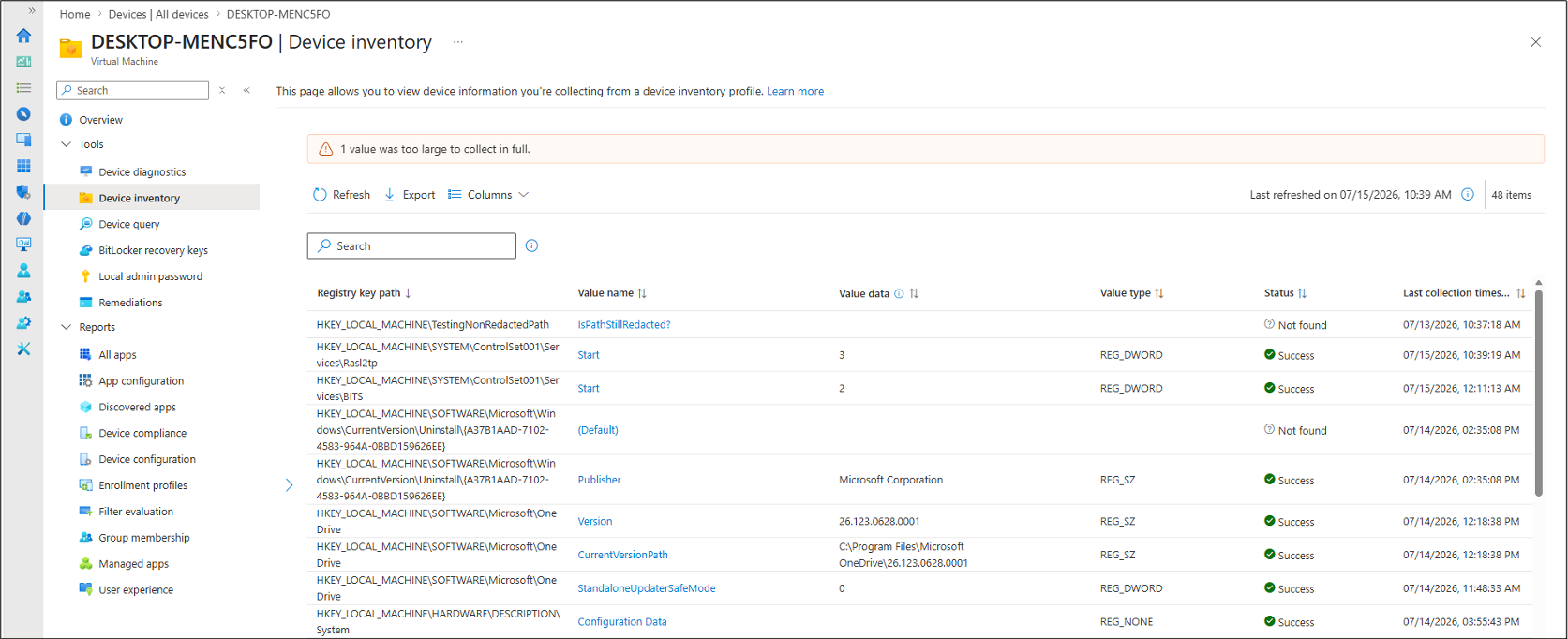
Windows Device Inventory can now collect registry information directly from managed devices, allowing administrators to verify real device configurations—not just the policies assigned to them.
⚙️ No more custom scripts
Simply define the registry keys you want to collect in the Properties Catalog, and Intune automatically inventories the data.
Collected information includes:
Registry key path Value name Value type Value data 🔍 Flexible collection options
For HKEY_LOCAL_MACHINE (HKLM), you can collect:
A single registry value from a specific key All values under a registry key (excluding subkeys) The same registry value across multiple subkeys 📈 Why this matters
Native Registry Inventory helps administrators:
Validate configuration settings Troubleshoot device issues faster Confirm policy deployment success Verify installed applications and versions Identify configuration drift across managed devices
All collected data is available directly within Device Inventory, alongside other device insights, making investigations much simpler.
🔒 Built with security in mind
Microsoft has included safeguards to prevent accidental collection of sensitive information such as:
Credentials Authentication tokens Encryption keys Connection strings
The feature is also intentionally limited to HKLM, ensuring it focuses on device-level configuration rather than user-specific data.
📊 Built-in limits
To maintain performance and prevent excessive collection:
Up to 100 registry keys can be configured per device Individual registry values are limited to 6 KB
Missing registry values are reported as "Not found", while empty values are collected successfully without impacting inventory results from other devices.
📦 Availability
Registry Inventory is included with Microsoft Intune Plan 1.
💡 Bottom line: This is a welcome addition for Intune administrators. Native Registry Inventory reduces scripting overhead, improves visibility into Windows configurations, and makes troubleshooting and compliance validation far more efficient—all from within the Intune portal.